Custom Tracking URLs
When you enable a custom tracking URL, every click-tracking link in your emails will use your own domain instead of www.mailblast.io. This keeps your brand consistent across every link a subscriber sees and gives you more control over deliverability.
Requirements
You need to own the domain you want to use. Pick a subdomain (something like emails or tracking) and point it to Mailblast with a CNAME record before adding it in your account.
DNS setup
In your DNS provider's control panel, add the following record:
| Field | Value |
|---|---|
| Name/Host | Your desired subdomain (e.g. emails or tracking) |
| Value | www.mailblast.io |
| Record Type | CNAME |
Add the domain in Mailblast
Once the DNS change has propagated, go to General Settings in your account and enter the full subdomain under Whitelabel Domain URL.
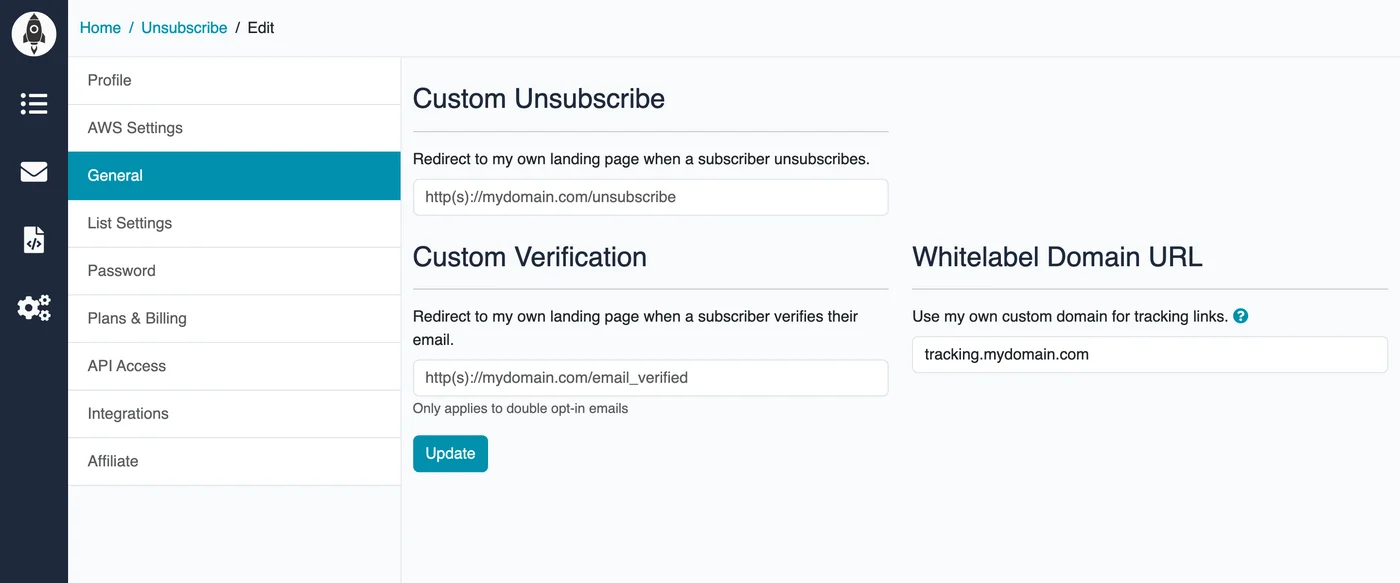
From the next campaign onwards, all tracking links will be rewritten to use your subdomain.